AI at WorkAI Team Build · Part 3 of 4
Build One Agent, Chain Two, Connect One Tool
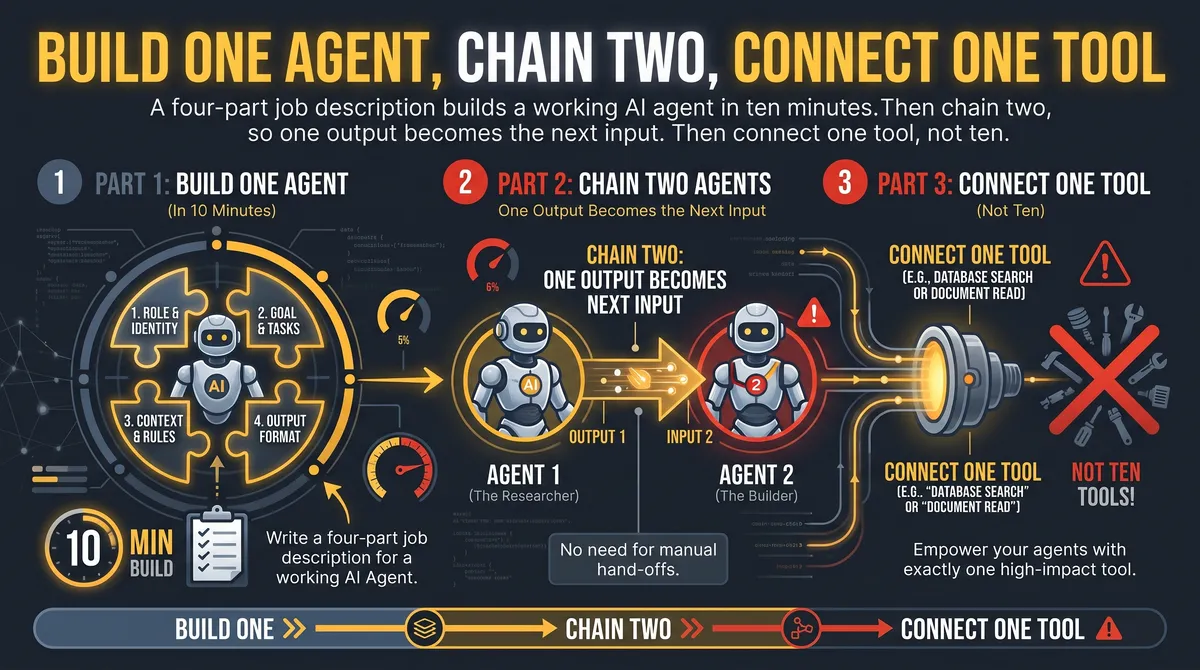
A four part job description builds a working AI agent in ten minutes. Then chain two, so one output becomes the next input.

8 min read
In short
The first agent the agency built had no output format, and it showed
The first job description had a role, a pile of context, and a task. It did not say what finished work looked like.
So every output came back in a different shape. One draft had headers, the next had none. One ended with a summary, the next ended mid thought. The agent was doing its job. The job had never said what done meant.
Adding one section fixed it. Output format is now the part of every instruction the agency writes first.
A four part job description is the whole instruction set an agent needs
Every agent on the team is described in four sections. Nothing else is required to start.
| Section | What it answers | Ridgeline Review Responder example |
|---|---|---|
| Role | Who is this agent, in one sentence, including the output it produces | You are the Review Responder for Ridgeline Plumbing and Air. You draft a reply to every new customer review for the office manager to approve. |
| Context | What the agent must know that it cannot guess | Company description, service area, the three things customers praise most, the two complaints that recur, the voice: warm, plain, never defensive, never a discount offer in a reply |
| Task | What to do when a review is pasted in | Read the review. Identify the reviewer's name if given and the service mentioned. Draft a reply under 80 words. Thank first, address the specific thing second, invite them back third. For a negative review, apologize once, state the next step, and move the conversation to a phone number. |
| Output format | What finished looks like | The reply only. No preamble. No options. One version. End with "Approve or edit before posting." |
That is the entire instruction. In the simplest version, Role lives permanently in the project instructions and you supply Context, Task, and Output format each session. That works on day one.
The step up, and the one Ridgeline takes, is to write the parts that never change into the instructions too: the standing context, the standing format. Then a session is nothing but the review and the word "go."
"Write me a social post" is a task with no role, no context, and no format. That is why the result reads like everyone else's. Anthropic's documentation describes project instructions as the place to define roles or perspectives Claude should adopt within the project and set guidelines for a particular workflow (Claude Help Center, Understanding Claude's personalization features). Role plus workflow. The four sections above are that, written out.
The one sentence mandate test. Read the Role section aloud.
If it cannot be said in one breath, the agent has two jobs. Split it.
The ten minute build, step by step
Timed at the desk. Ten minutes assumes the four sections are drafted in a note first, which is the "Do this today" item from Parts 1 and 2.
Create a project
In Claude, open Projects and create a new one. Name it with the numbering convention below. Projects are available on free accounts, up to five (Claude Help Center, What are projects?).
Open project instructions
Paste the four sections. Role first, output format last. Save.
Add knowledge, sparingly
Upload the files the Context section refers to and nothing else. For Ridgeline: a one page company description and a document with five past reviews and the replies Dana liked. Project knowledge is loaded into every chat in the project, so a file that does not earn its place costs attention on every task.
Run the smallest real task
Paste one real review. Read the draft. Do not fix the draft. Fix the instruction that produced it, then run the same review again.
Run three more
One positive, one negative, one vague. If all three come back in the right shape, the agent is built. If one does not, the instruction has a gap. Write the missing rule into the section where it belongs.
Step four is the one people skip
Editing the draft gets you one good reply. Editing the instruction gets you every reply after it.
Correcting the output teaches nothing. Correcting the instruction teaches the agent.
Number every agent so the team has an order
A long list of projects in a sidebar is unusable. The agency names each one with the workflow phase number, then a sequence number, then the role: 1.01 for the first agent in the first phase, 2.03 for the third agent in the second phase, and so on.
Ridgeline has two phases to start, responding and publishing, so it would name them 1.01 Review Responder and 2.01 Newsletter Drafter.
- Projects sort by name, so numbers put the team in the order work flows through it.
- A numbered role is a role that has been thought about as a position on a team rather than a one off experiment.
Someone with four projects gets the same benefit as someone with twenty five. The number is a small commitment and it matters more than it looks.
Chaining means one agent's output is the next agent's input
A chain is two agents whose job descriptions are written so the first one's output format matches the second one's expected input. No integration. No automation platform. A copy and a paste, done by a person, on purpose.
Ridgeline's two step chain, runnable today
Agent 1.01, Review Responder
Output format now includes one extra line at the bottom: a single sentence tagging the review with the service performed and the sentiment.
Agent 2.01, Newsletter Drafter
Role: drafts the monthly customer newsletter for Dana to approve.
Context: company description, newsletter voice, the standing structure, which is one seasonal tip, one recent job story, one call to book.
Task: given a list of TAG lines from the month, pick the most common service, write a short story around it without naming any customer, and draft the issue.
Output format: subject line, three sections, under 350 words, ends with "Approve or edit before sending."
At month end Dana pastes the month's TAG lines into Agent 2.01. The newsletter that has gone out four times this year now has a draft on the first of every month. The chain took two job descriptions and one extra output line.
A chain is only as good as the handoff line.
If Agent 1.01's tag format changes, Agent 2.01 breaks. Write the handoff format into both instructions, word for word.
Connect one tool, chosen for the job the chain does
Connectors let Claude reach into apps you already use. They run on the Model Context Protocol, an open standard Anthropic created, and Anthropic provides first party integrations with Google Drive, Gmail, Google Calendar, GitHub, Slack, and Microsoft 365 that need nothing beyond signing in (Claude Docs, Connectors overview). The path is Settings, then Connectors.
Without a connector, Claude can tell you what to do in a tool. With one, it can act in the tool.
Anthropic's documentation states that Claude inherits each person's permissions from the connected service, so if you cannot access a file or record in the source system, neither can the agent (Use connectors to extend Claude's capabilities). Google Workspace connectors for Gmail, Calendar, and Drive are available for all users, and by default Claude asks for approval before sending, replying to, or forwarding email (Use Google Workspace connectors).
Start with one. The instinct is to connect everything on day one. Every connected tool is a new surface where a mistake can land in a real inbox or a real file.
Ridgeline connects Google Drive, because that is where the monthly job list lives and where the newsletter drafts should be saved. Nothing else. Gmail waits until the newsletter has shipped cleanly for three months.
The approval prompt before a send is not friction to be removed.
It is the rule this whole series rests on: agents produce, humans approve.
Ten minutes builds the agent; the next ten builds make it good
The first agent takes ten minutes. The tenth agent teaches more than the first nine, because by then the numbering, the mandates, and the handoff lines have been wrong enough times to be right.
What this does not do: an agent built this way does not run on its own. Someone pastes the review in and someone approves the reply. That is by design. Autonomy comes later, if ever, and only for steps that have been reviewed enough times to be boring.
Do this today, free, under five minutes
Take the one sentence from Part 1 and turn it into the Role section. Write three bullets under Context that the agent could not guess. That is half the job description.