AI at WorkAI Team Build · Part 2 of 4
The Three Claude Settings Almost Nobody Touches
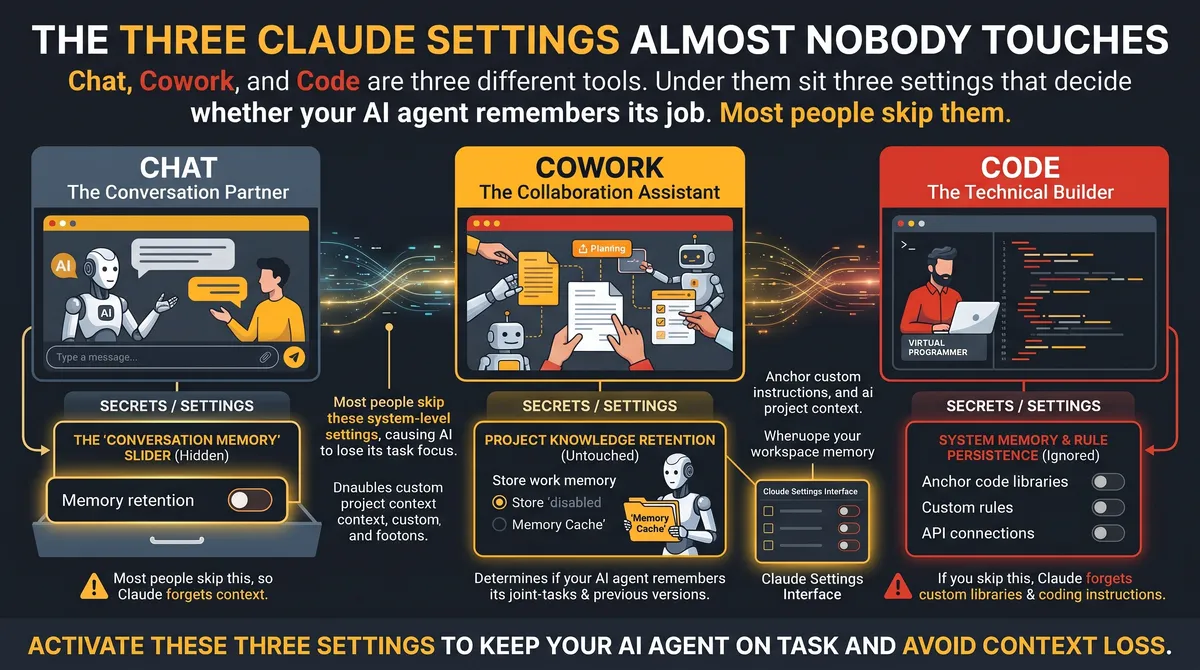
Chat, Cowork, and Code are three different tools. Under them sit three settings that decide whether your AI agent remembers its job.

8 min read
In short
For three months the agency called the wrong thing by the wrong name
The mistake was a category error, twice over.
Claude Code got opened for a task that belonged in Cowork, because the two looked like the same thing with a different amount of typing. And every agent's role, context, and rules were written into a single field that got called a "skill" in every internal note for about three months.
It was not a skill. It was a set of project instructions. The two are different features that do different things, and the confusion cost real time: instructions were written in a format meant for one feature and pasted into the other, then rewritten when they did not behave.
Anthropic's documentation states the difference in one line. Projects provide static background knowledge that is always loaded when you start chats within them. Skills provide specialized procedures that activate dynamically when needed and work everywhere across Claude (Claude Help Center, What are skills?).
Read that twice. The rest of this post is the map that would have prevented the error.
Chat, Cowork, and Code are three tools for three shapes of work
The three surfaces are not tiers of the same thing. They are built for different work.
| Surface | Built for | What it is good at | What it is not |
|---|---|---|---|
| Chat | Thinking with Claude | Drafting, brainstorming, questions, one tool at a time | A system that holds work across sessions |
| Cowork | Delegating to Claude | Handing over a whole task, files, apps, multi step work that comes back finished | A conversation. Reach for it when you would normally do the work yourself, not ask about it |
| Code | Building software with Claude | A development environment inside a codebase, terminal and git access | A tool most business owners need |
Definitions from Claude Academy, Introduction to Claude Cowork.
Chat is a conversation you think with. Cowork is a coworker you delegate to.
Most first time users treat Cowork like a chat window with a longer memory. Anthropic names that as the single biggest shift new Cowork users have to make: type an outcome, step away, and come back to finished work, rather than iterating turn by turn.
Four Cowork caveats, stated plainly
- It requires a paid plan (claude.com/product/cowork).
- It runs in the cloud and executes code. Tasks run on Anthropic's servers in beta, in an isolated environment, and carry risks tied to its agentic nature and internet access (Get started with Claude Cowork). Anthropic publishes a separate safety page worth reading first.
- It consumes more of your usage allocation than chatting, because multi step tasks are compute intensive. Anthropic's own advice is to batch related work into single sessions and use standard chat for simpler questions (Get started with Claude Cowork).
The fourth one is the one to read twice
Cowork is not yet covered under Anthropic's HIPAA Business Associate Agreement (HIPAA-ready Enterprise plans).
A medspa, a clinic, or a mortgage office reading this needs that sentence more than any feature list on the page.
Three instruction layers decide whether an agent remembers its job
Under every surface sit three places to write instructions. Anthropic's current documentation names them Instructions for Claude, project instructions, and skills (Claude Help Center, Understanding Claude's personalization features).
| Layer | Scope | Use it for | Do not use it for |
|---|---|---|---|
| Instructions for Claude | Account wide, every conversation | How you like to be spoken to. Terms you use. Formats you prefer | Any single agent's role. Client context. Long rules |
| Project instructions | One project, every chat inside it | The agent's job description: role, context, task, output format | Preferences that apply to you everywhere |
| Skills | Loaded when a task calls for it, works everywhere | Repeatable procedures: a brand guideline, a report format, a document workflow | Background knowledge that should always be present |
Each field has a limit on how much it will hold. Anthropic does not publish the counts. Like One's 2026 guide, which tracks these limits, puts the account wide field at 1,500 characters and project instructions at roughly 8,000 (Like One, Claude Custom Instructions Guide), and reports that the project field shows a live counter as you type (Like One, Claude Projects Custom Instructions Guide). Treat both numbers as the current reading rather than a promise, and watch the counter. Part 4 tells the story of what happens when the field fills anyway.
One naming note, in case your menu says something else. Older guides, and the first draft of this series, called the third layer Styles, the per chat tone presets. Anthropic's current documentation folds that job into skills, and third party guides describe Styles as having a migration path into skills (AI Toolbox).
If your menu still says Styles, it is the same layer. Skills also include prebuilt document skills for Word, Excel, PowerPoint, and PDF files that fire on their own when you ask for one of those files (What are skills?).
Projects are available on free accounts, capped at five (Claude Help Center, What are projects?). Five is enough to build the first three agents in Part 3 and keep two spare.
Stuffing the account wide field is the most common beginner error
The account wide field is the one people find first, so it is the one that gets everything. Client names. Brand voice. The whole standard operating procedure.
Then every conversation, including the one asking for a dinner recipe, loads all of it.
- Noise. Instructions meant for one job leak into every job.
- Drift. When the account wide field and a project's instructions disagree, the output splits the difference and neither rule wins cleanly.
The account wide field holds how you work. The project field holds what one agent does. Keep the first short enough to read in a minute.
Ridgeline needs Chat for one thing and a project for another
Dana at Ridgeline has been using Chat to draft review responses. Every session starts the same way: paste the company description, paste three example replies, paste the review, ask for a draft.
Ten minutes of setup for two minutes of work.
The fix is not a better prompt. It is a project. One project called "Review Responder" with instructions that carry the company description, the voice, the three examples, and the rule that every reply gets read by Dana before it posts. From then on, each session is: paste the review, get the draft. The setup happened once.
Ridgeline does not need Cowork yet. It does not need Code at all. It needs one project with one job description, which is exactly what Part 3 builds step by step.
Two signals tell you when a task has outgrown Chat
The move from Chat to a project, and later from a project to Cowork, is not about how advanced the user is. It is about the shape of the task.
| Signal | What it means | Where the task belongs |
|---|---|---|
| The same setup gets pasted more than twice | The task has a standing role and standing context | A project with instructions |
| The task has files to read, steps to run, and a finished output to hand back | The task is a piece of work, not a question | Cowork, once the project instructions are stable |
| The task is a one time question with no standard to hold | The task is a conversation | Chat |
Ridgeline's review replies tripped the first signal months ago. The monthly newsletter, which needs the job list read, the story drafted, and a document produced, will trip the second once the Newsletter Drafter in Part 3 has run cleanly a few times in a project.
Until then it stays a project, because moving a task to Cowork before its instruction is stable means delegating an unclear job to a coworker who will do exactly what the unclear job says.
The beginner is paying for a product and using a fraction of it
Chat plus the account wide field is one surface and one layer out of six. That is where almost everyone starts and where most people stay. The other four are not advanced features. They are the difference between an assistant that forgets and an agent that holds a role.
What this does not do: knowing the six pieces does not make an agent good. A project with a vague job description is a vague agent with a persistent memory of being vague. The writing matters more than the setting.
Do this today, free, under five minutes
Open Settings and read your Instructions for Claude field. If any sentence in it belongs to one specific job or one specific client, cut it and save it in a note.
That note becomes the first draft of a project instruction in Part 3.